Volunteering App
Volunteering App
Volunteering App
Overview
Volunteering is a rewarding way to give back to your community and learn new skills. Recently, as part of a collaborative project, our cohort designed and built a mobile app to connect volunteers with local opportunities.
This app aims to streamline the volunteer experience, making it easier for people to find causes they care about and donate their time.
My contribution
User research
Product design
The team
5 × hci researchers
Year
2022
Overview
Volunteering is a rewarding way to give back to your community and learn new skills. Recently, as part of a collaborative project, our cohort designed and built a mobile app to connect volunteers with local opportunities.
This app aims to streamline the volunteer experience, making it easier for people to find causes they care about and donate their time.
My contribution
User research
Product design
The team
5 × hci researchers
Year
2022
Overview
Volunteering is a rewarding way to give back to your community and learn new skills. Recently, as part of a collaborative project, our cohort designed and built a mobile app to connect volunteers with local opportunities.
This app aims to streamline the volunteer experience, making it easier for people to find causes they care about and donate their time.
My contribution
User research
Product design
The team
5 × hci researchers
Year
2022
Process
Breaking down the project
The City of York Council has requested an app that will provide York residents with an overview of the range of activities they can undertake and keep a record of them. Users should be able to complete the following three activities, which will be reflected as a component of functionality within the application:
Discover a range of volunteering opportunities at York for different options before selecting an activity and committing to it.
Select a time and date when the user wants to take part in the activity from a predefined set of options.
Allow users to keep a record of the opportunities they have been involved in and their reflections on these.
Developing of the initial user requirements
In this volunteer interaction prototype design. First of all, we defined the purpose of the survey and adopted the questionnaire survey to collect data in the early stage. The content of the questionnaire was determined through group discussion and referencing current websites trying to achieve the same. The questionnaire consisted mainly of closed questions, supplemented by open and semi-structured questions.
Survey questionnaire:
How do you describe yourself?
What is your age?
Do you speak English fluently?
How would you prefer to volunteer?
Do you have any previous volunteering experience?
What causes are you willing to service?
Have you identified a specific need/cause in York that you think should be addressed?
When would you prefer to take up volunteering work?
How much time are you willing to commit to the volunteering work?
Where do you usually look for availability of volunteer services?
Will you be interested in a newsletter to stay updated with the available volunteering opportunities?
Do you have any professional experience in following sectors?
How important are following factors to you before joining a volunteer organisation?
What are your desired goals out of your service in volunteering?
Would you like to keep a track of your volunteering activities?
How would you prefer to get in touch?
Would you like to share any additional information?
Affinity Diagramming
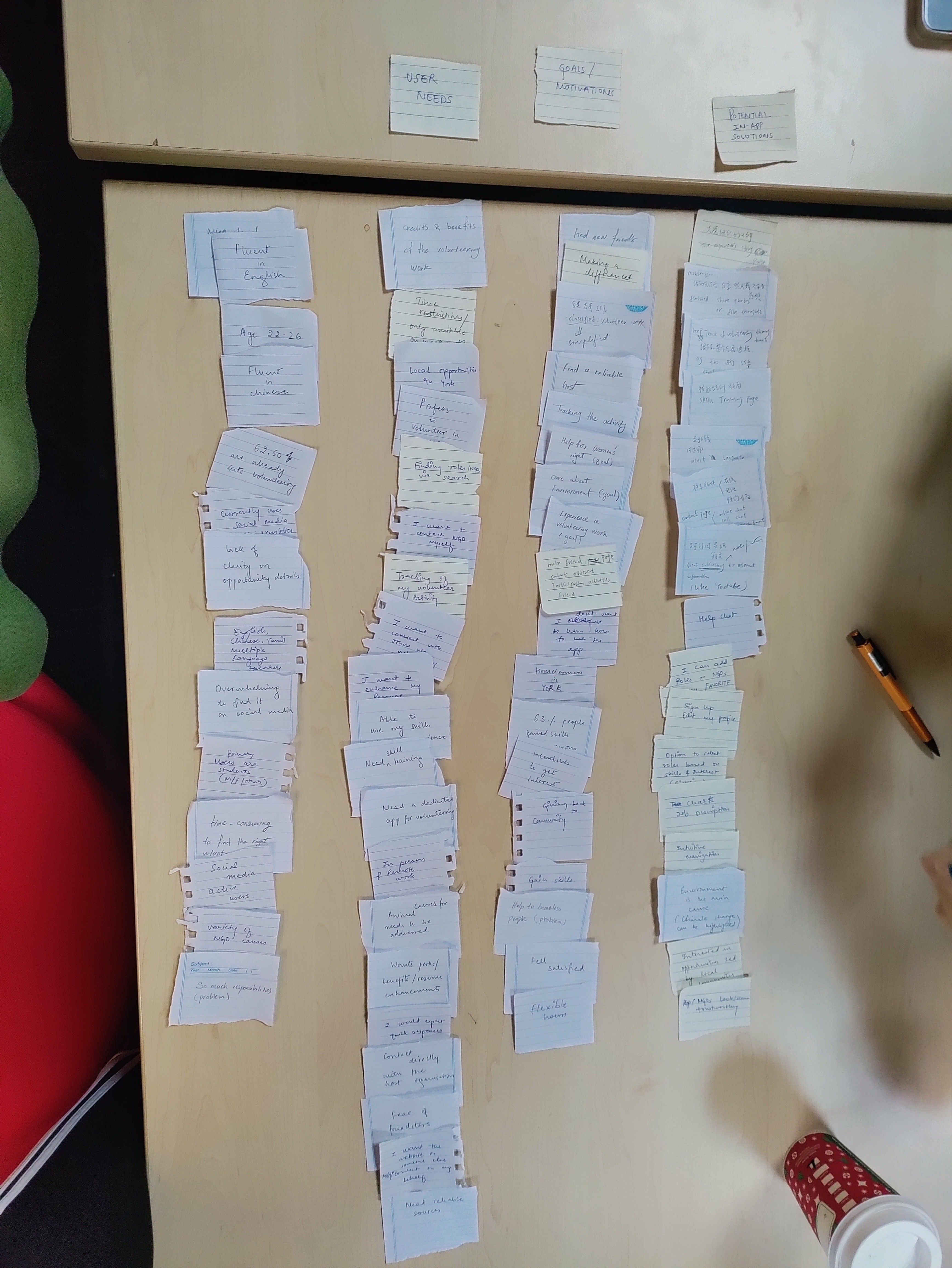
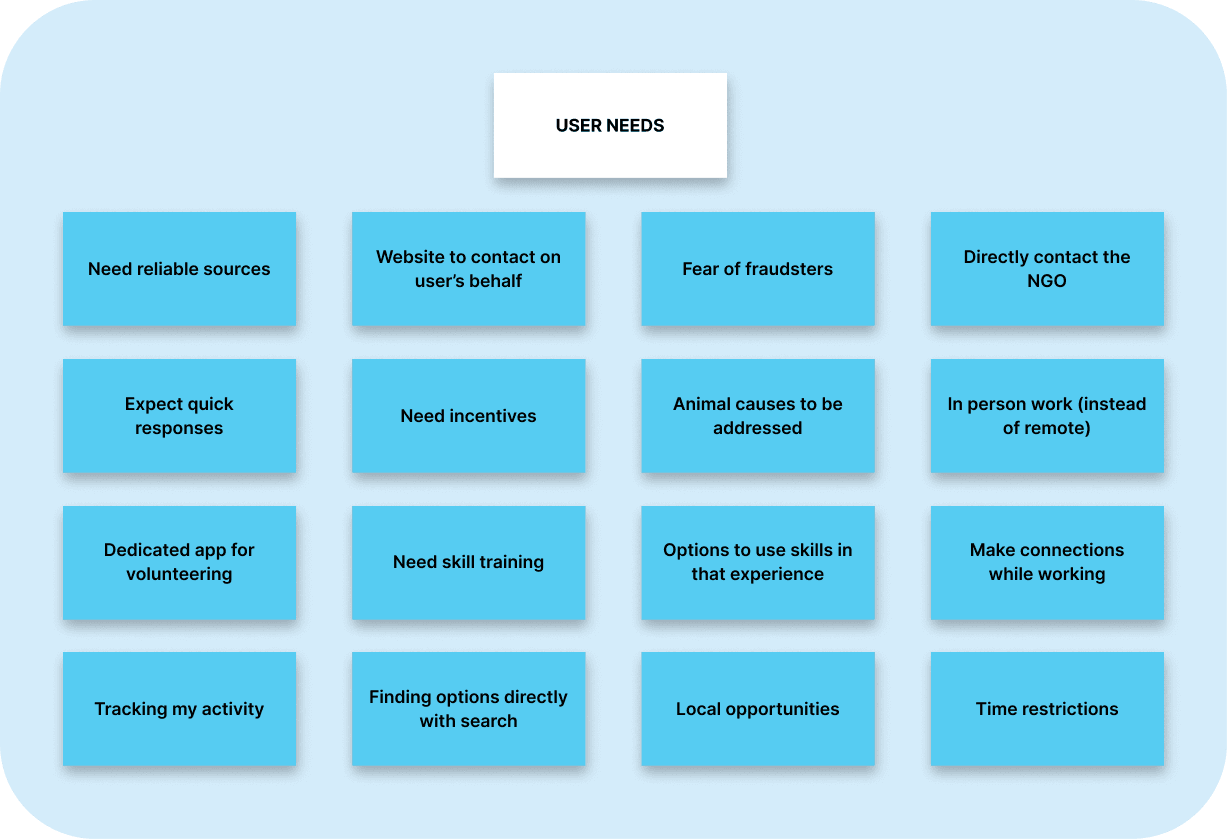
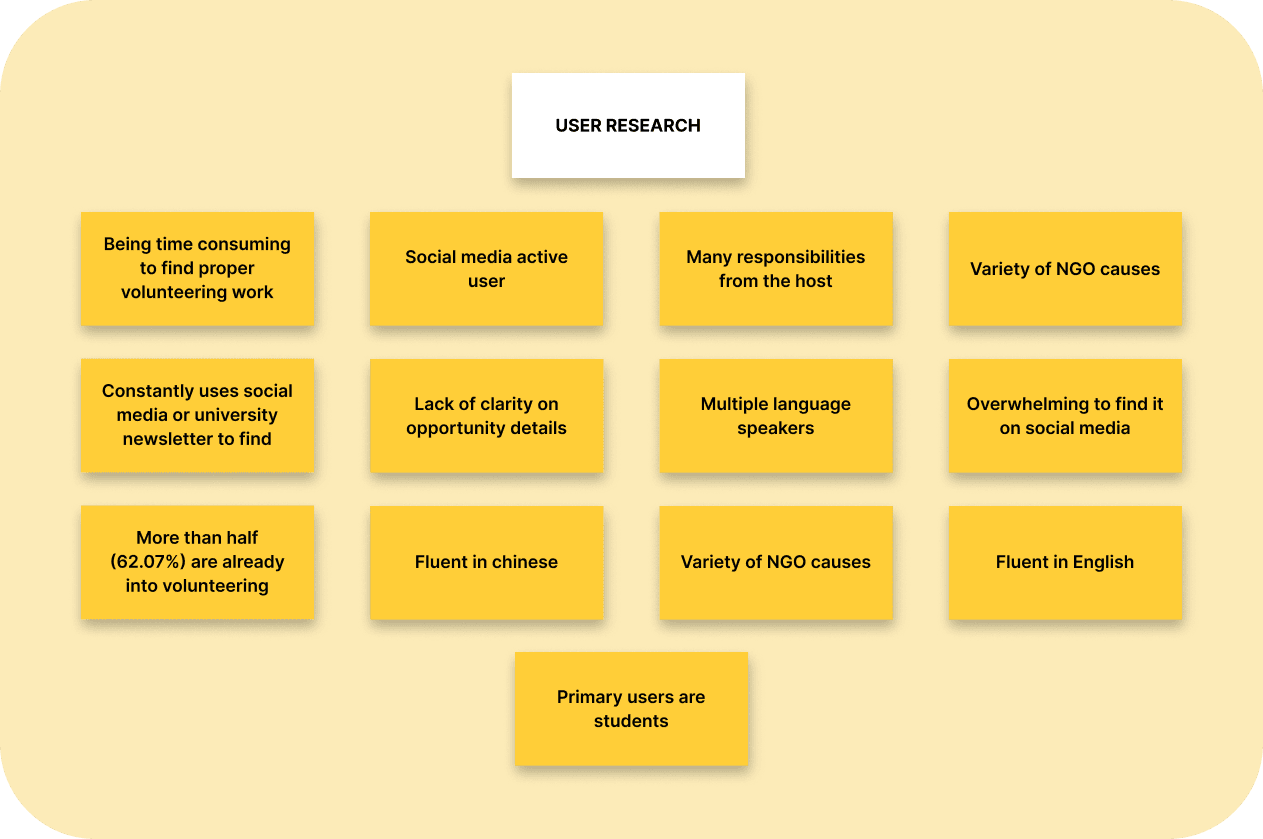
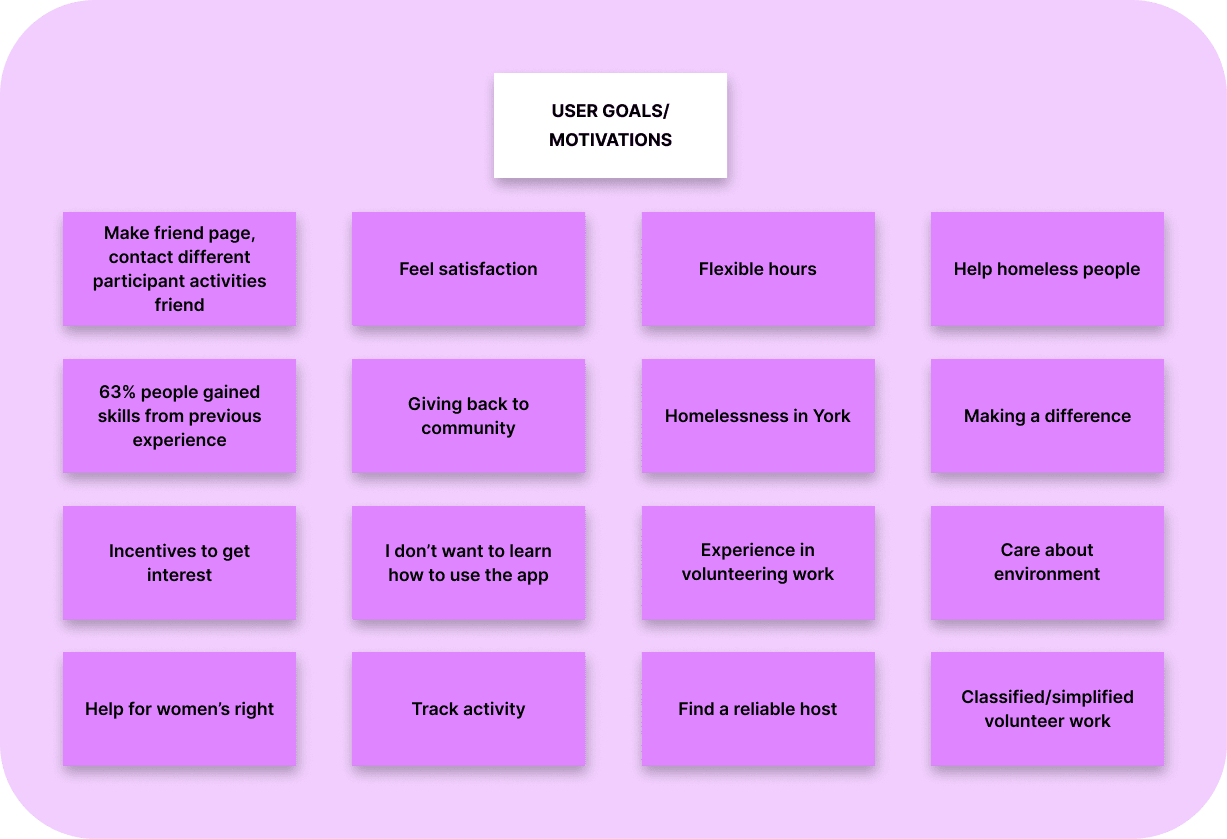
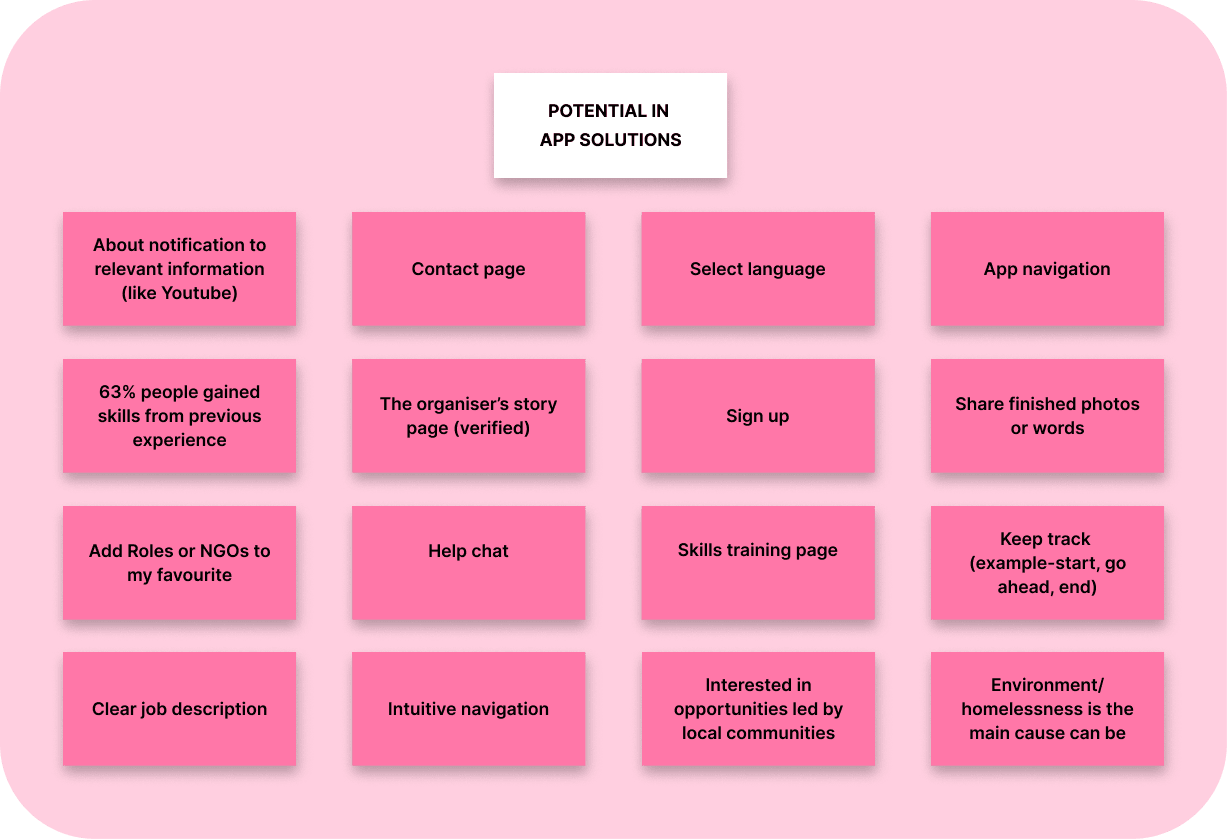
After getting the survey results, the team undertook affinity diagramming exercise for data analysis. Based on the findings in the survey, each member of the team wrote down their ideas and observations on a note. Later, all the ideas were placed together and the common patterns were organised under suitable themes and categories. The team used paper-pencil to complete this exercise and miro software to visually represent the affinity diagramming.
This exercise helped us in understanding and narrowing down our researched data more clearly. With the help of affinity diagramming, we were able to break down complex survey information into four major key components.
Personas Creation Behaviours & Analysis


Based on the survey results, we proceeded to create two personas.
Scenario-Based Design
The problem or as-is scenario informs about the current interactions of users with the application, whereas, the activity or to-be scenario shows us how users would interact with the new application.
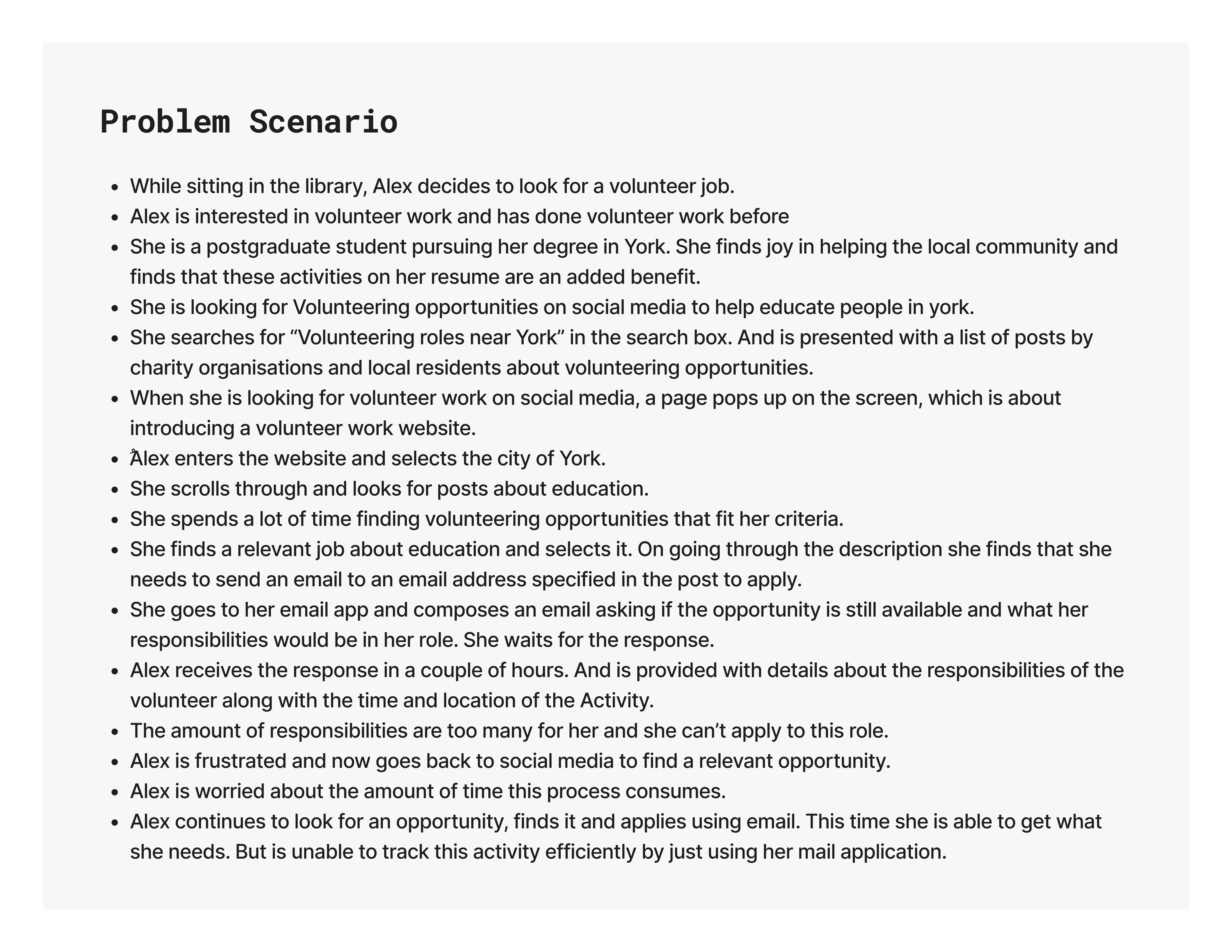
The problem scenario is written about Alex. Alex is a 23-year-old woman and a master's student. She is interested in art and humanities. She cares about social issues such as defending women's rights, fighting discrimination, and education. One of the problems that she has justified in York is homelessness, which has caught her attention. Alex has volunteer work experience and likes to be able to use her knowledge and expertise in her free time (weekends). Also, she is looking for points and credits for her resume as well.
So to write the scenario, she is imagined to be sitting in the university library and looking for volunteer work on social media. She comes across many potential opportunities via posts from different organisations. She spends a lot of time finding the right job that fits her standards and criteria. She finally finds a job and decides to contact the author of the post. So she sends an email, and after hours of waiting,. she receives information about the opportunity. She realises that the task in question carries a lot of responsibilities for her. (A point that people mentioned during the survey.) So she must go through the same path again to find a suitable job. Among the problems that have been pointed out are the process of searching for volunteer work being time-consuming and easy contact to related organisations being unavailable and also the tasks needing to be clearly defined in the volunteer work information section.
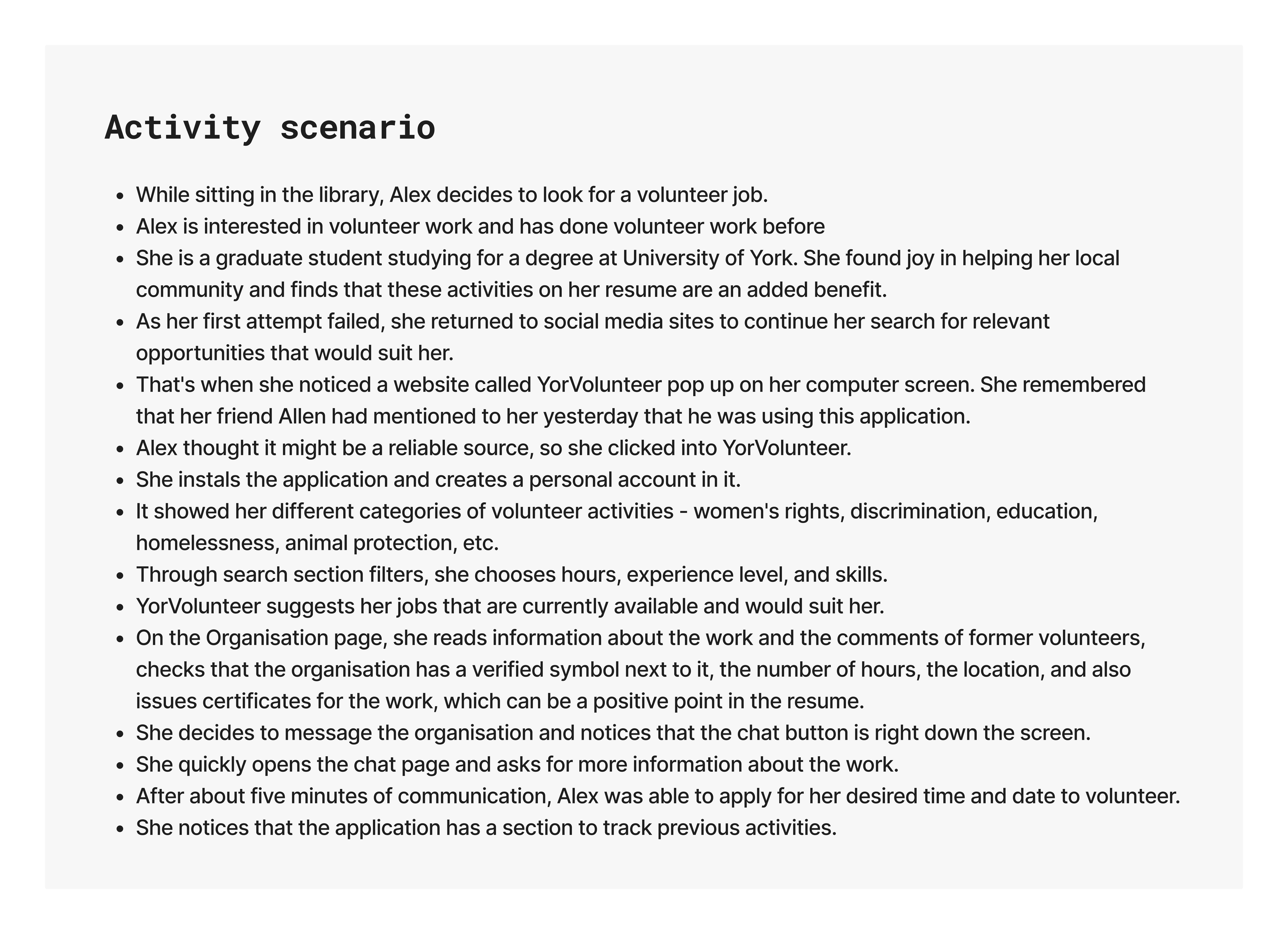
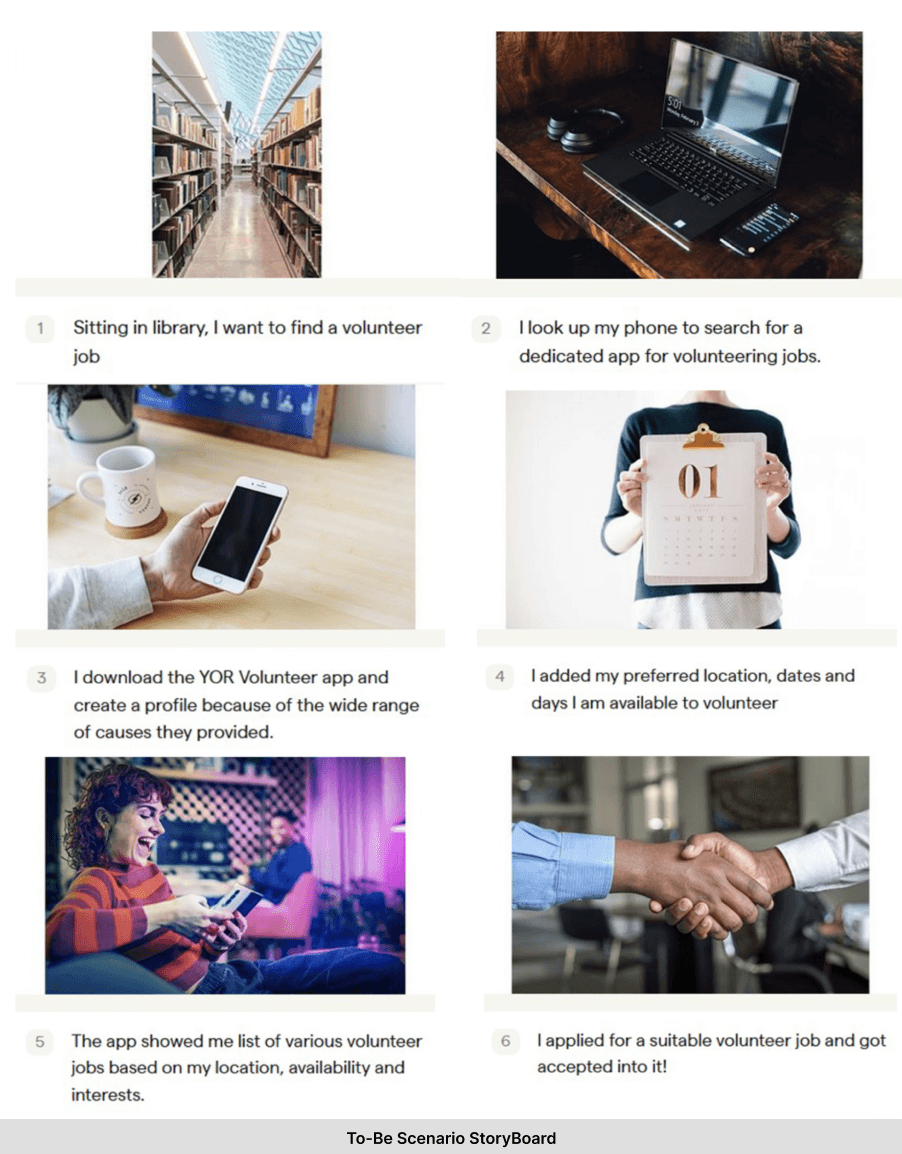
In the activity scenario, it has been tried to show how the problems will be solved with the newly designed application. Alex is interested in social media and spends a lot of time on it, So she got acquainted with this application when she was spending time on it while she had already heard about this application from her friend. After installing and activating the personal account in the search section, she will notice the filter section, which can select the category section of topics of interest such as women's rights, discrimination, education, homelessness, animal protection, etc., suitable time, place, level of experience and skill that she is interested in working in that field. When Alex searches her keyword, she comes across a list of tasks. Job information is specified on the jobs page and even the amount of credit is written for some works. If Alex has a question, she can quickly and directly send a message to the agent via chat box, which makes the process faster. She can see her past activities in a separate section of the application and register ratings for organisations using reviews, which is very helpful for other people looking for reliable organisers.
In the activity scenario, efforts were made to resolve these issues. A person can search easily and contact the host directly and quickly if needed and find activities through the search that are reliable, specific, and separated. However, do not create unreasonable responsibilities for her.
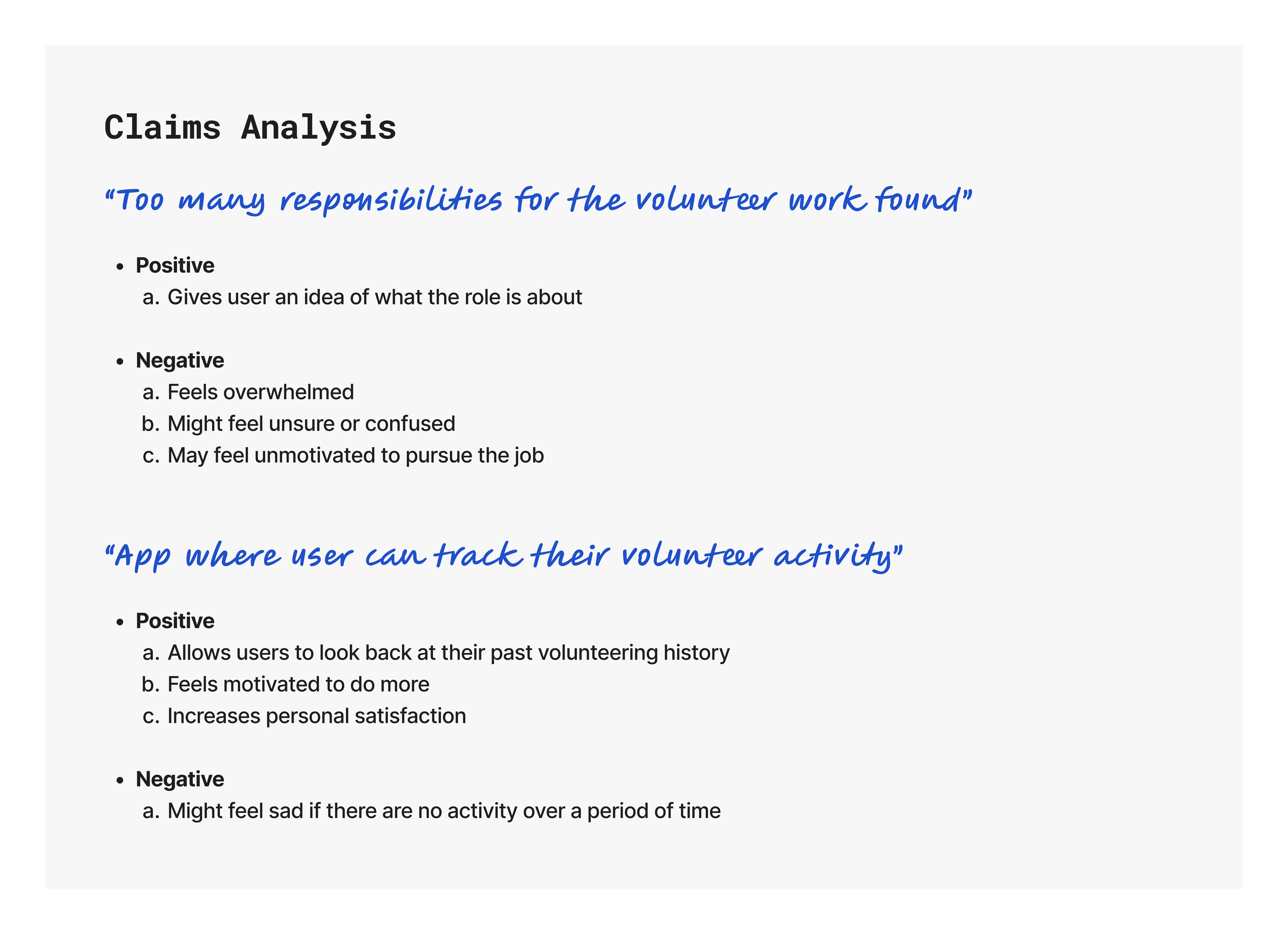
A claims analysis is a record related to these scenarios but draws our attention to both positive and negative aspects of the user while the user performs the tasks. Based on both scenarios mentioned above, the team conducted a claims analysis for as-is scenario and to-be scenario. This exercise helped us closely examine what users go through when undertaking feature specific task(s). With the help of a claims analysis, the team was able to preserve features which had a positive impact on users, and worked on improving or providing better alternatives for the features which had a negative impact.
StoryBoard
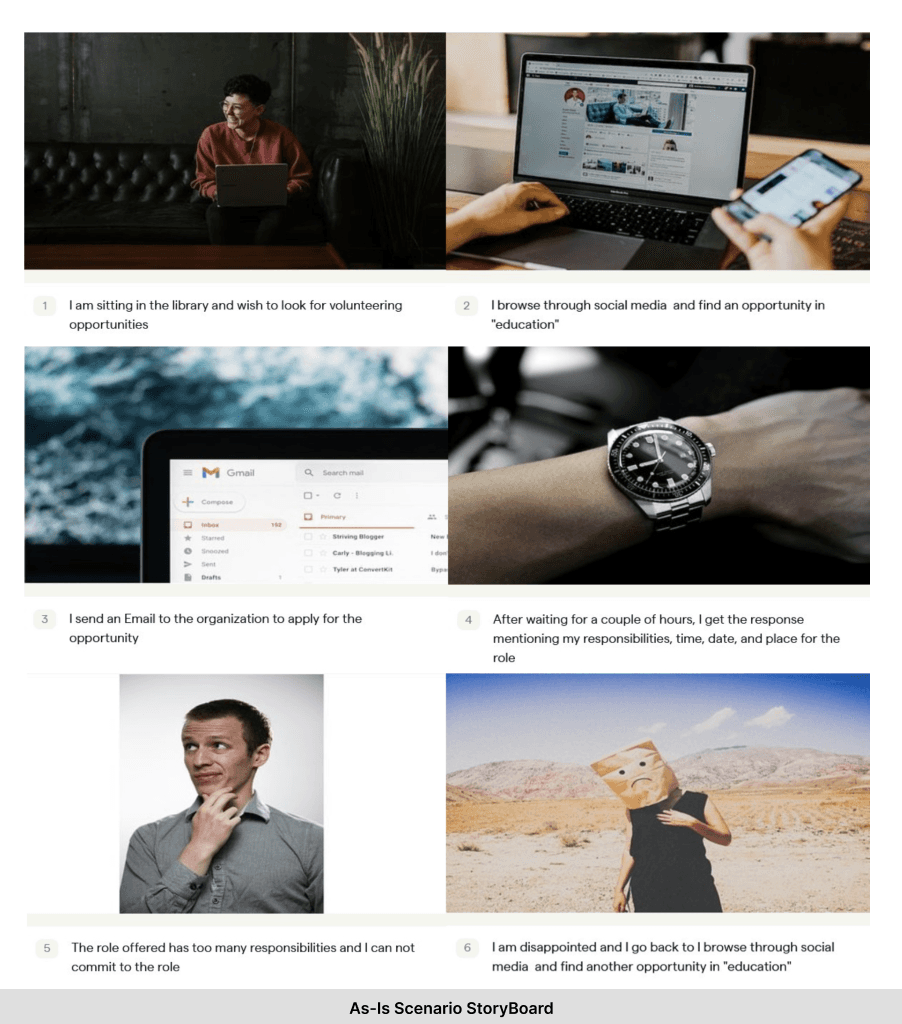
The team proceeded to make storyboards based on the personas represented previously. The purpose of creating a storyboard was to understand where our users would be performing actions from and how they would go about undertaking or completing certain task(s). After illustrating a few concepts, the team finalised two final versions of storyboards for as-is scenario and to-be scenario. The team used Boords to create digital versions of storyboards.
Evaluation of the Prototype
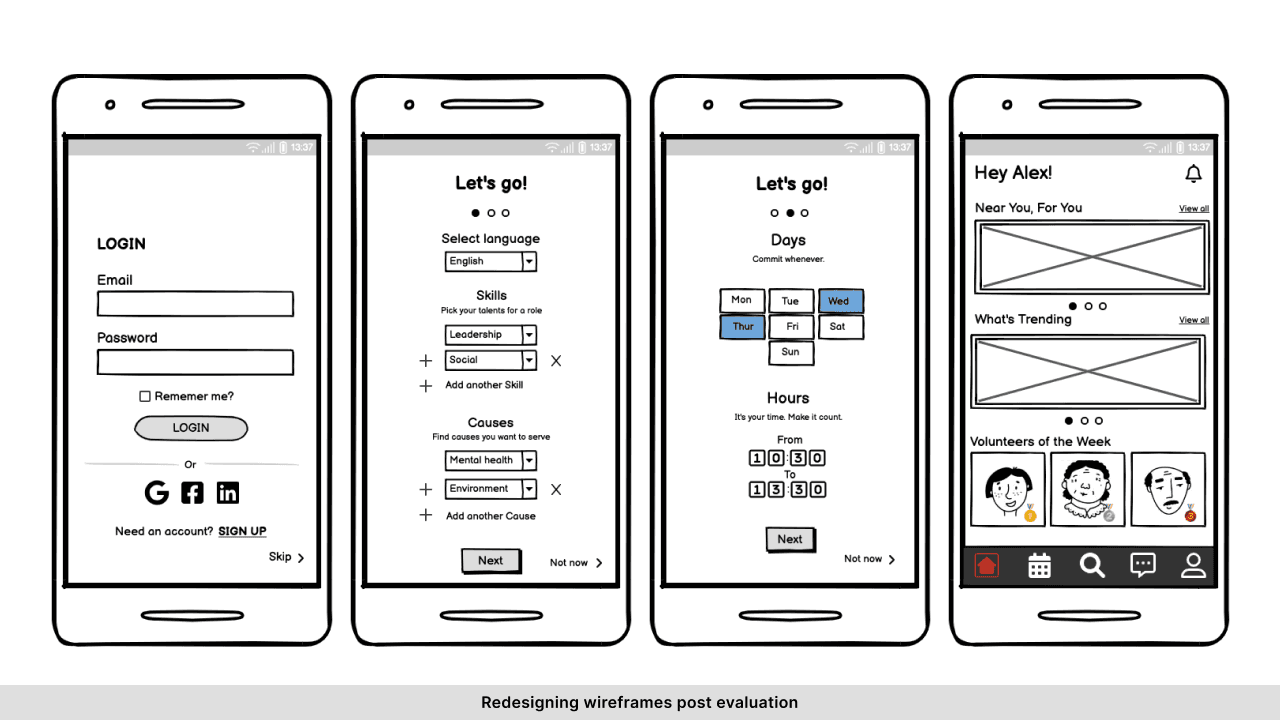
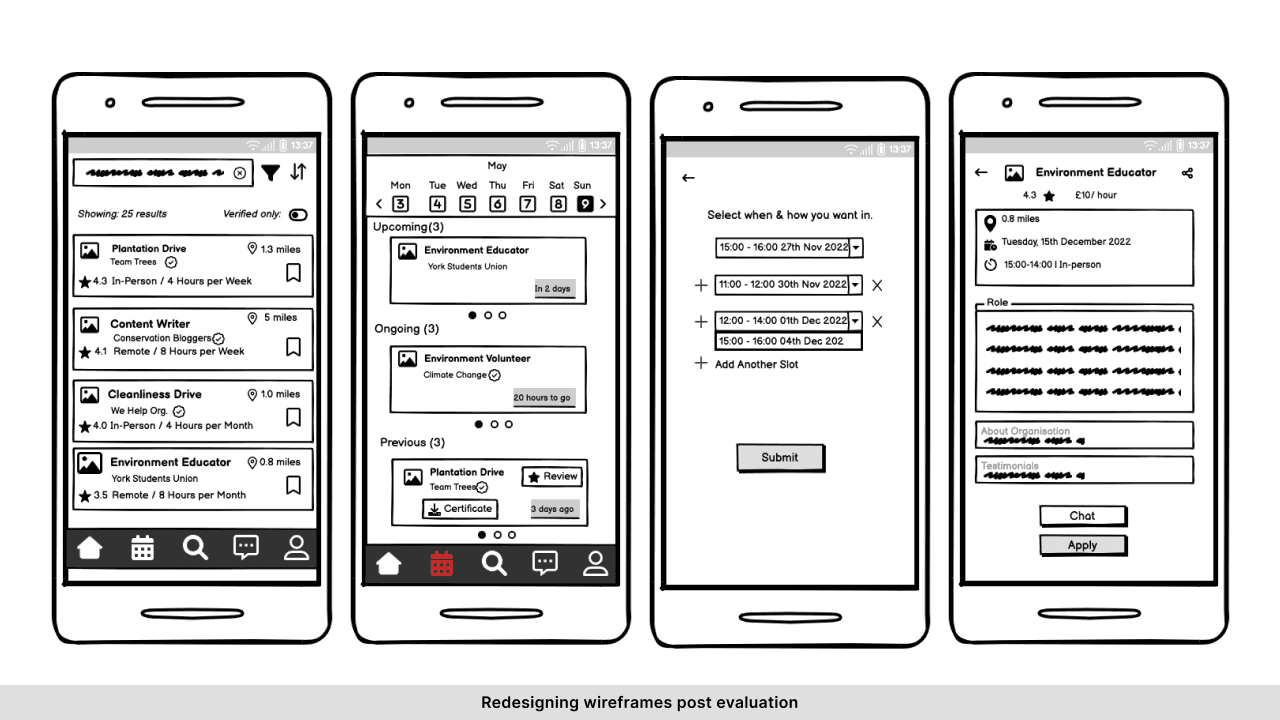
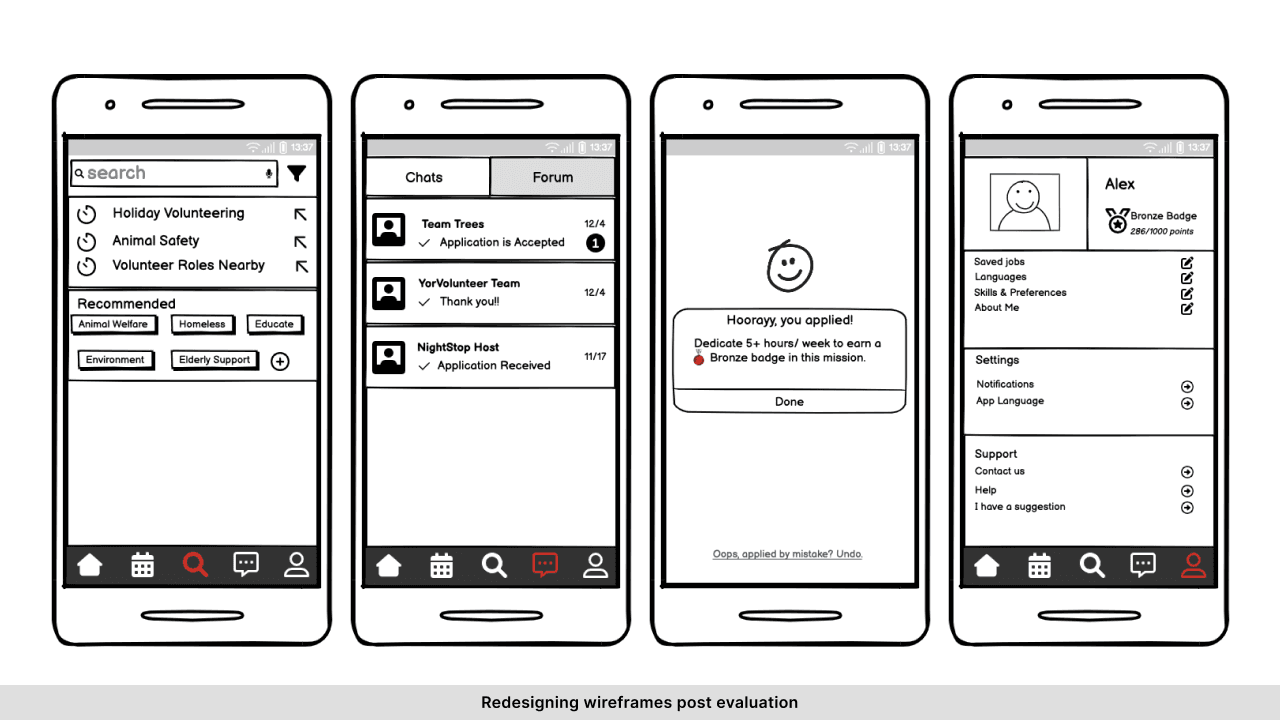
We primarily used Tog’s principles and Nielsen’s principles as our guiding foundations to build the application wireframes using pen and paper and then proceeded to make our low-fidelity prototype using Balsamiq.
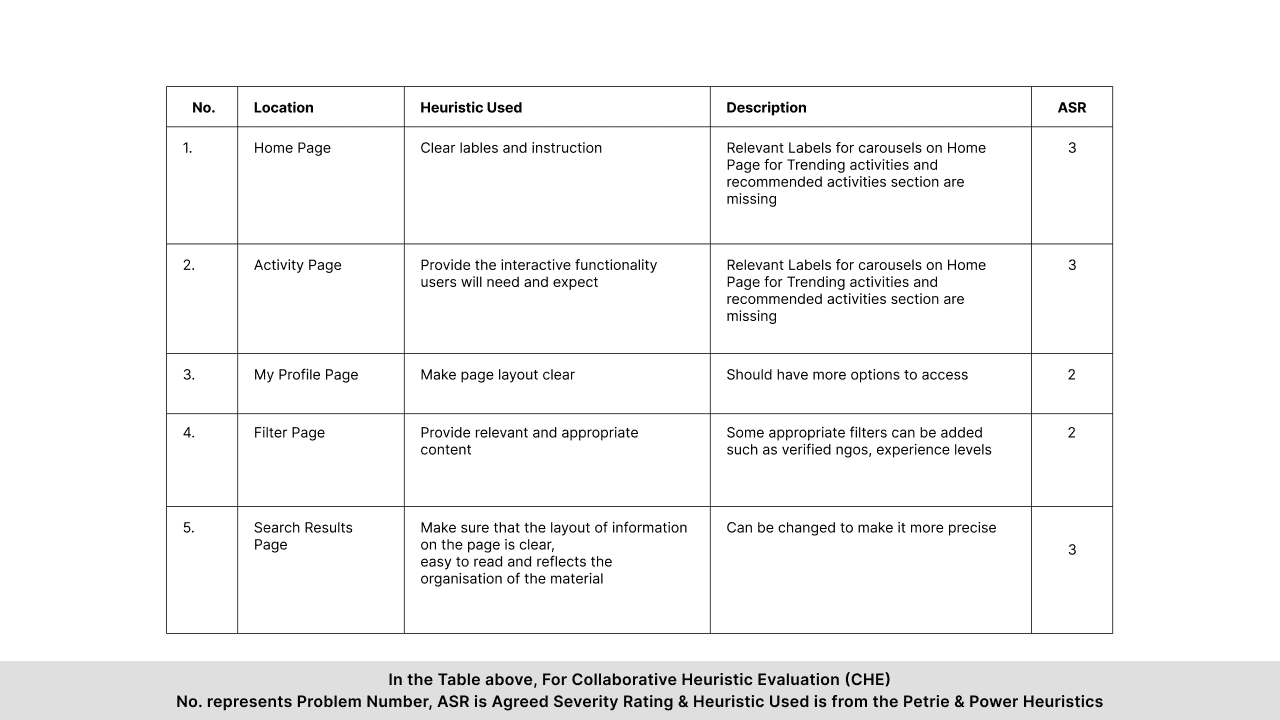
The group undertook a Collaborative Heuristic Evaluation (CHE) followed by a Task Based User Evaluation (TBUE) on the prototype. The report on this evaluation included a description of the method used and problems (and severity ratings of those problems) detected in the evaluation.
For CHE our group designed the three stage process as follows:
What is the System?
Who are the Users?
Tasks To Do during Heuristic Evaluation
Reporting of usability problems and severity ratings
For TBUE our testing methods were as follows:
Participant recruitment
Defining set of tasks
(SignUp to YorVolunteer Application.
Search for a Volunteering opportunity.
Apply for an Opportunity with the Cause Environment for single or multiple date and time slots.
Ask a Question to the Organisation you chose.
Review your last Volunteering Activity.
Download a Certificate for a Prior Activity.
Check Reward Points.
Preparing an environment
Planning the execution of tasks
Concurrent Verbal Protocol (CVP)
Compiling our Data
Making Design Recommendations
Process
Breaking down the project
The City of York Council has requested an app that will provide York residents with an overview of the range of activities they can undertake and keep a record of them. Users should be able to complete the following three activities, which will be reflected as a component of functionality within the application:
Discover a range of volunteering opportunities at York for different options before selecting an activity and committing to it.
Select a time and date when the user wants to take part in the activity from a predefined set of options.
Allow users to keep a record of the opportunities they have been involved in and their reflections on these.
Developing of the initial user requirements
In this volunteer interaction prototype design. First of all, we defined the purpose of the survey and adopted the questionnaire survey to collect data in the early stage. The content of the questionnaire was determined through group discussion and referencing current websites trying to achieve the same. The questionnaire consisted mainly of closed questions, supplemented by open and semi-structured questions.
Survey questionnaire:
How do you describe yourself?
What is your age?
Do you speak English fluently?
How would you prefer to volunteer?
Do you have any previous volunteering experience?
What causes are you willing to service?
Have you identified a specific need/cause in York that you think should be addressed?
When would you prefer to take up volunteering work?
How much time are you willing to commit to the volunteering work?
Where do you usually look for availability of volunteer services?
Will you be interested in a newsletter to stay updated with the available volunteering opportunities?
Do you have any professional experience in following sectors?
How important are following factors to you before joining a volunteer organisation?
What are your desired goals out of your service in volunteering?
Would you like to keep a track of your volunteering activities?
How would you prefer to get in touch?
Would you like to share any additional information?
Affinity Diagramming
After getting the survey results, the team undertook affinity diagramming exercise for data analysis. Based on the findings in the survey, each member of the team wrote down their ideas and observations on a note. Later, all the ideas were placed together and the common patterns were organised under suitable themes and categories. The team used paper-pencil to complete this exercise and miro software to visually represent the affinity diagramming.
This exercise helped us in understanding and narrowing down our researched data more clearly. With the help of affinity diagramming, we were able to break down complex survey information into four major key components.
Personas Creation Behaviours & Analysis
Based on the survey results, we proceeded to create two personas.
Scenario-Based Design
The problem or as-is scenario informs about the current interactions of users with the application, whereas, the activity or to-be scenario shows us how users would interact with the new application.
The problem scenario is written about Alex. Alex is a 23-year-old woman and a master's student. She is interested in art and humanities. She cares about social issues such as defending women's rights, fighting discrimination, and education. One of the problems that she has justified in York is homelessness, which has caught her attention. Alex has volunteer work experience and likes to be able to use her knowledge and expertise in her free time (weekends). Also, she is looking for points and credits for her resume as well.
So to write the scenario, she is imagined to be sitting in the university library and looking for volunteer work on social media. She comes across many potential opportunities via posts from different organisations. She spends a lot of time finding the right job that fits her standards and criteria. She finally finds a job and decides to contact the author of the post. So she sends an email, and after hours of waiting,. she receives information about the opportunity. She realises that the task in question carries a lot of responsibilities for her. (A point that people mentioned during the survey.) So she must go through the same path again to find a suitable job. Among the problems that have been pointed out are the process of searching for volunteer work being time-consuming and easy contact to related organisations being unavailable and also the tasks needing to be clearly defined in the volunteer work information section.
In the activity scenario, it has been tried to show how the problems will be solved with the newly designed application. Alex is interested in social media and spends a lot of time on it, So she got acquainted with this application when she was spending time on it while she had already heard about this application from her friend. After installing and activating the personal account in the search section, she will notice the filter section, which can select the category section of topics of interest such as women's rights, discrimination, education, homelessness, animal protection, etc., suitable time, place, level of experience and skill that she is interested in working in that field. When Alex searches her keyword, she comes across a list of tasks. Job information is specified on the jobs page and even the amount of credit is written for some works. If Alex has a question, she can quickly and directly send a message to the agent via chat box, which makes the process faster. She can see her past activities in a separate section of the application and register ratings for organisations using reviews, which is very helpful for other people looking for reliable organisers.
In the activity scenario, efforts were made to resolve these issues. A person can search easily and contact the host directly and quickly if needed and find activities through the search that are reliable, specific, and separated. However, do not create unreasonable responsibilities for her.
A claims analysis is a record related to these scenarios but draws our attention to both positive and negative aspects of the user while the user performs the tasks. Based on both scenarios mentioned above, the team conducted a claims analysis for as-is scenario and to-be scenario. This exercise helped us closely examine what users go through when undertaking feature specific task(s). With the help of a claims analysis, the team was able to preserve features which had a positive impact on users, and worked on improving or providing better alternatives for the features which had a negative impact.
StoryBoard
The team proceeded to make storyboards based on the personas represented previously. The purpose of creating a storyboard was to understand where our users would be performing actions from and how they would go about undertaking or completing certain task(s). After illustrating a few concepts, the team finalised two final versions of storyboards for as-is scenario and to-be scenario. The team used Boords to create digital versions of storyboards.
Evaluation of the Prototype
We primarily used Tog’s principles and Nielsen’s principles as our guiding foundations to build the application wireframes using pen and paper and then proceeded to make our low-fidelity prototype using Balsamiq.
The group undertook a Collaborative Heuristic Evaluation (CHE) followed by a Task Based User Evaluation (TBUE) on the prototype. The report on this evaluation included a description of the method used and problems (and severity ratings of those problems) detected in the evaluation.
For CHE our group designed the three stage process as follows:
What is the System?
Who are the Users?
Tasks To Do during Heuristic Evaluation
Reporting of usability problems and severity ratings
For TBUE our testing methods were as follows:
Participant recruitment
Defining set of tasks
(SignUp to YorVolunteer Application.
Search for a Volunteering opportunity.
Apply for an Opportunity with the Cause Environment for single or multiple date and time slots.
Ask a Question to the Organisation you chose.
Review your last Volunteering Activity.
Download a Certificate for a Prior Activity.
Check Reward Points.
Preparing an environment
Planning the execution of tasks
Concurrent Verbal Protocol (CVP)
Compiling our Data
Making Design Recommendations
Process
Breaking down the project
The City of York Council has requested an app that will provide York residents with an overview of the range of activities they can undertake and keep a record of them. Users should be able to complete the following three activities, which will be reflected as a component of functionality within the application:
Discover a range of volunteering opportunities at York for different options before selecting an activity and committing to it.
Select a time and date when the user wants to take part in the activity from a predefined set of options.
Allow users to keep a record of the opportunities they have been involved in and their reflections on these.
Developing of the initial user requirements
In this volunteer interaction prototype design. First of all, we defined the purpose of the survey and adopted the questionnaire survey to collect data in the early stage. The content of the questionnaire was determined through group discussion and referencing current websites trying to achieve the same. The questionnaire consisted mainly of closed questions, supplemented by open and semi-structured questions.
Survey questionnaire:
How do you describe yourself?
What is your age?
Do you speak English fluently?
How would you prefer to volunteer?
Do you have any previous volunteering experience?
What causes are you willing to service?
Have you identified a specific need/cause in York that you think should be addressed?
When would you prefer to take up volunteering work?
How much time are you willing to commit to the volunteering work?
Where do you usually look for availability of volunteer services?
Will you be interested in a newsletter to stay updated with the available volunteering opportunities?
Do you have any professional experience in following sectors?
How important are following factors to you before joining a volunteer organisation?
What are your desired goals out of your service in volunteering?
Would you like to keep a track of your volunteering activities?
How would you prefer to get in touch?
Would you like to share any additional information?
Affinity Diagramming
After getting the survey results, the team undertook affinity diagramming exercise for data analysis. Based on the findings in the survey, each member of the team wrote down their ideas and observations on a note. Later, all the ideas were placed together and the common patterns were organised under suitable themes and categories. The team used paper-pencil to complete this exercise and miro software to visually represent the affinity diagramming.
This exercise helped us in understanding and narrowing down our researched data more clearly. With the help of affinity diagramming, we were able to break down complex survey information into four major key components.
Personas Creation Behaviours & Analysis
Based on the survey results, we proceeded to create two personas.
Scenario-Based Design
The problem or as-is scenario informs about the current interactions of users with the application, whereas, the activity or to-be scenario shows us how users would interact with the new application.
The problem scenario is written about Alex. Alex is a 23-year-old woman and a master's student. She is interested in art and humanities. She cares about social issues such as defending women's rights, fighting discrimination, and education. One of the problems that she has justified in York is homelessness, which has caught her attention. Alex has volunteer work experience and likes to be able to use her knowledge and expertise in her free time (weekends). Also, she is looking for points and credits for her resume as well.
So to write the scenario, she is imagined to be sitting in the university library and looking for volunteer work on social media. She comes across many potential opportunities via posts from different organisations. She spends a lot of time finding the right job that fits her standards and criteria. She finally finds a job and decides to contact the author of the post. So she sends an email, and after hours of waiting,. she receives information about the opportunity. She realises that the task in question carries a lot of responsibilities for her. (A point that people mentioned during the survey.) So she must go through the same path again to find a suitable job. Among the problems that have been pointed out are the process of searching for volunteer work being time-consuming and easy contact to related organisations being unavailable and also the tasks needing to be clearly defined in the volunteer work information section.
In the activity scenario, it has been tried to show how the problems will be solved with the newly designed application. Alex is interested in social media and spends a lot of time on it, So she got acquainted with this application when she was spending time on it while she had already heard about this application from her friend. After installing and activating the personal account in the search section, she will notice the filter section, which can select the category section of topics of interest such as women's rights, discrimination, education, homelessness, animal protection, etc., suitable time, place, level of experience and skill that she is interested in working in that field. When Alex searches her keyword, she comes across a list of tasks. Job information is specified on the jobs page and even the amount of credit is written for some works. If Alex has a question, she can quickly and directly send a message to the agent via chat box, which makes the process faster. She can see her past activities in a separate section of the application and register ratings for organisations using reviews, which is very helpful for other people looking for reliable organisers.
In the activity scenario, efforts were made to resolve these issues. A person can search easily and contact the host directly and quickly if needed and find activities through the search that are reliable, specific, and separated. However, do not create unreasonable responsibilities for her.
A claims analysis is a record related to these scenarios but draws our attention to both positive and negative aspects of the user while the user performs the tasks. Based on both scenarios mentioned above, the team conducted a claims analysis for as-is scenario and to-be scenario. This exercise helped us closely examine what users go through when undertaking feature specific task(s). With the help of a claims analysis, the team was able to preserve features which had a positive impact on users, and worked on improving or providing better alternatives for the features which had a negative impact.
StoryBoard
The team proceeded to make storyboards based on the personas represented previously. The purpose of creating a storyboard was to understand where our users would be performing actions from and how they would go about undertaking or completing certain task(s). After illustrating a few concepts, the team finalised two final versions of storyboards for as-is scenario and to-be scenario. The team used Boords to create digital versions of storyboards.
Evaluation of the Prototype
We primarily used Tog’s principles and Nielsen’s principles as our guiding foundations to build the application wireframes using pen and paper and then proceeded to make our low-fidelity prototype using Balsamiq.
The group undertook a Collaborative Heuristic Evaluation (CHE) followed by a Task Based User Evaluation (TBUE) on the prototype. The report on this evaluation included a description of the method used and problems (and severity ratings of those problems) detected in the evaluation.
For CHE our group designed the three stage process as follows:
What is the System?
Who are the Users?
Tasks To Do during Heuristic Evaluation
Reporting of usability problems and severity ratings
For TBUE our testing methods were as follows:
Participant recruitment
Defining set of tasks
(SignUp to YorVolunteer Application.
Search for a Volunteering opportunity.
Apply for an Opportunity with the Cause Environment for single or multiple date and time slots.
Ask a Question to the Organisation you chose.
Review your last Volunteering Activity.
Download a Certificate for a Prior Activity.
Check Reward Points.
Preparing an environment
Planning the execution of tasks
Concurrent Verbal Protocol (CVP)
Compiling our Data
Making Design Recommendations
Outcome
Collaborating with the internal team
Throughout the process, I worked closely with 4 another researchers. We held regular brainstorming sessions to generate ideas for the volunteering app, ensuring a diverse range of perspectives were considered. We also utilized shared document management tools to keep everyone on the same page. This facilitated real-time updates, fostered transparency, and allowed for seamless collaboration on project documents.
Together, we explored ideas for matching volunteers' skills and interests with relevant opportunities, fostering a sense of community among volunteers, and providing clear communication channels between volunteers and organizations.
Outcome
Collaborating with the internal team
Throughout the process, I worked closely with 4 another researchers. We held regular brainstorming sessions to generate ideas for the volunteering app, ensuring a diverse range of perspectives were considered. We also utilized shared document management tools to keep everyone on the same page. This facilitated real-time updates, fostered transparency, and allowed for seamless collaboration on project documents.
Together, we explored ideas for matching volunteers' skills and interests with relevant opportunities, fostering a sense of community among volunteers, and providing clear communication channels between volunteers and organizations.
Outcome
Collaborating with the internal team
Throughout the process, I worked closely with 4 another researchers. We held regular brainstorming sessions to generate ideas for the volunteering app, ensuring a diverse range of perspectives were considered. We also utilized shared document management tools to keep everyone on the same page. This facilitated real-time updates, fostered transparency, and allowed for seamless collaboration on project documents.
Together, we explored ideas for matching volunteers' skills and interests with relevant opportunities, fostering a sense of community among volunteers, and providing clear communication channels between volunteers and organizations.